Repeater Group Field
The Repeater Group Field allows you to collect multiple sets of related information within a single form. Instead of repeating one field at a time, this field lets users repeat an entire group of fields together. It is ideal for scenarios where the same type of information needs to be collected multiple times, such as founder details, family members, or multiple contacts.
At the same time, you can still allow specific fields inside the group to repeat when needed, giving you flexible control over complex data collection.
Adding the Repeater Group Field
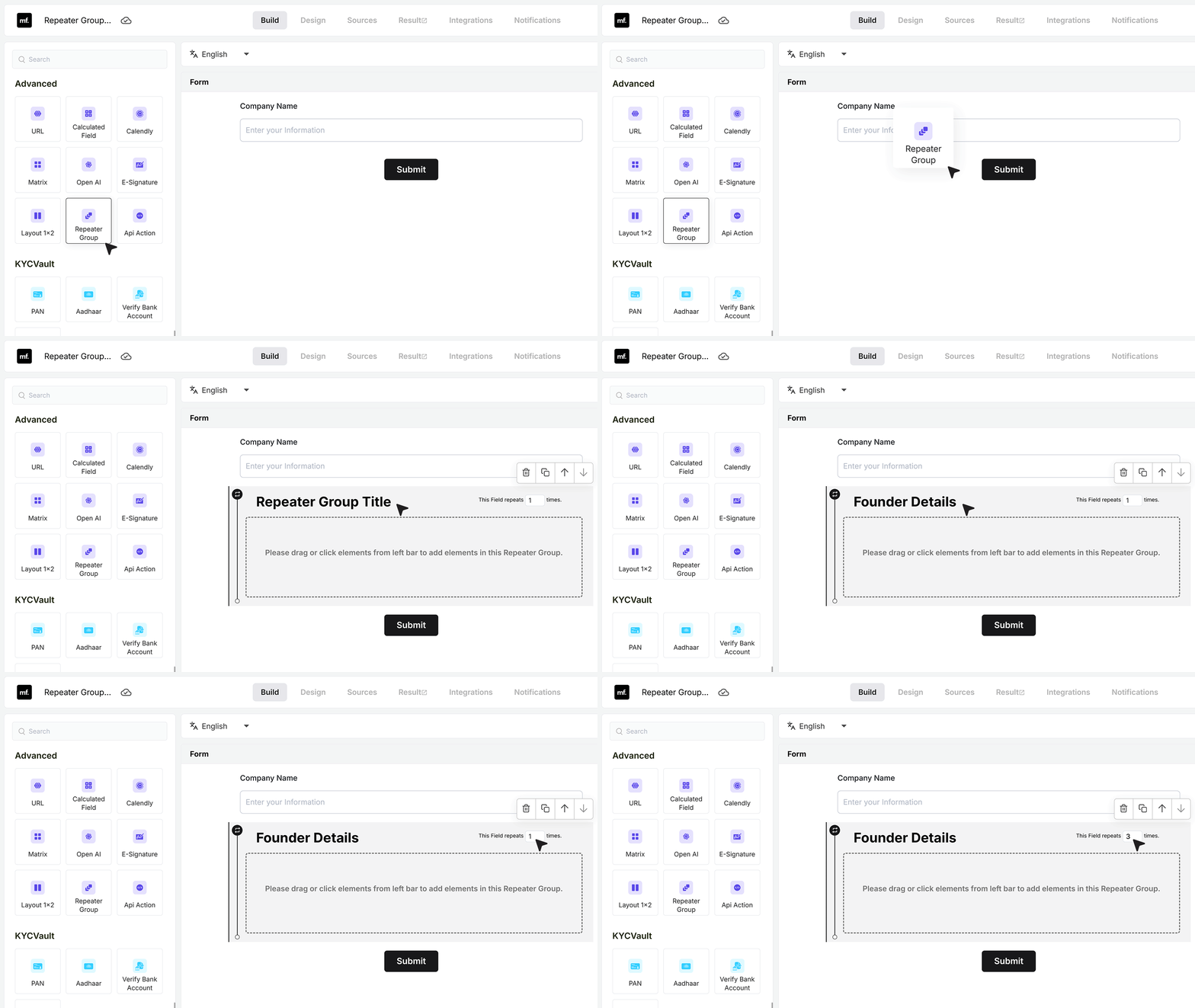
To get started, open your form in the editor. In this example, the form already contains a Company Name field. From the field panel, search for Repeater Group and drag the Repeater Group Field into your form. Place it below the Company Name field to keep the form flow logical.
Once the repeater group is added, give it a clear and descriptive name, such as Founder Details. You can also set how many times the group can be repeated. For example, you may allow users to add details for up to three founders.
Adding Fields Inside the Group
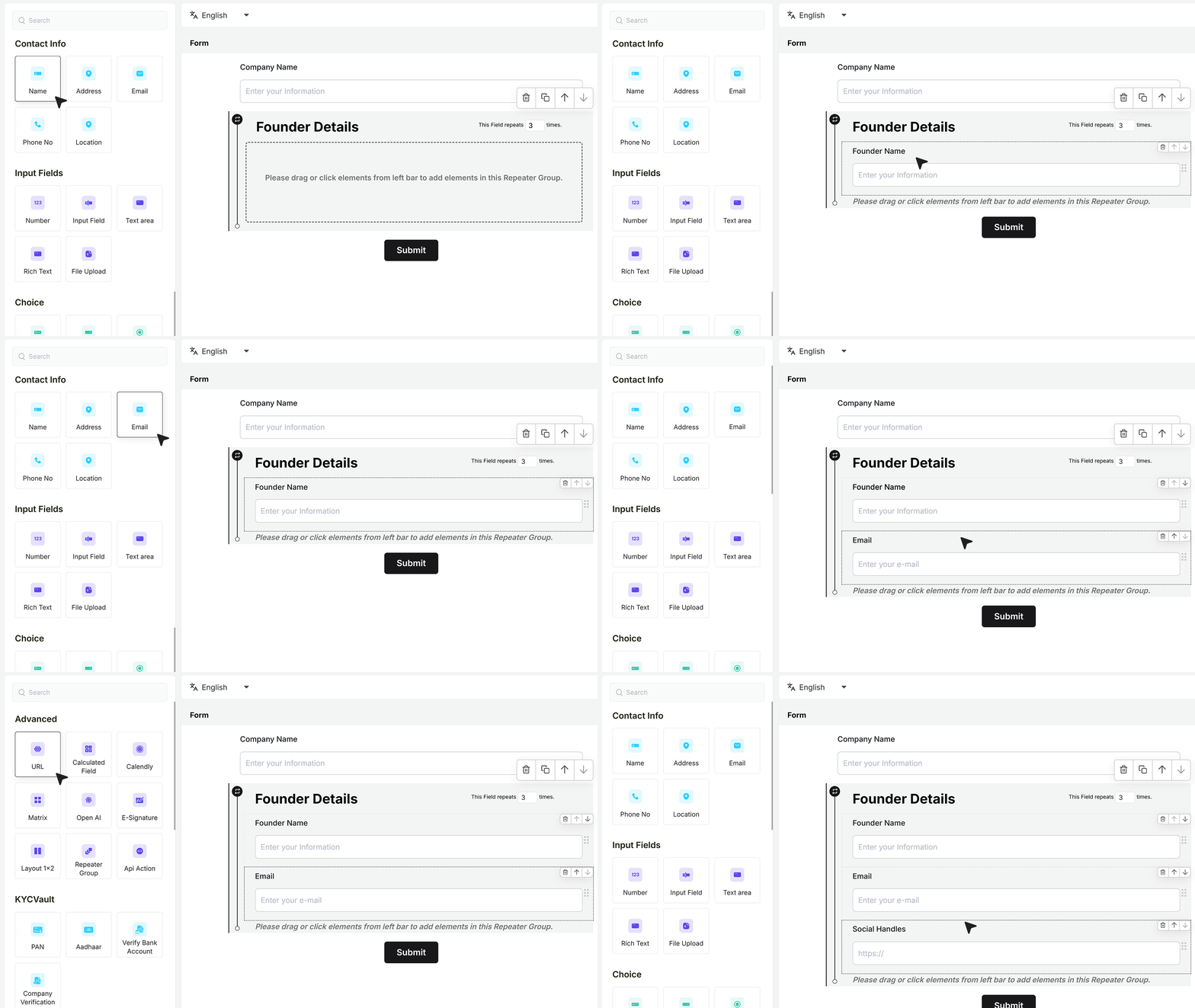
After creating the group, start adding fields inside it. For example, add a field for Founder Name and then add an Email Address field. Each time the group is added, it represents one complete set of founder details.
You can also add a Social Handles field to collect profile links such as LinkedIn or Twitter. Every group added by the user will include these same fields.
Repeating Fields Inside the Group
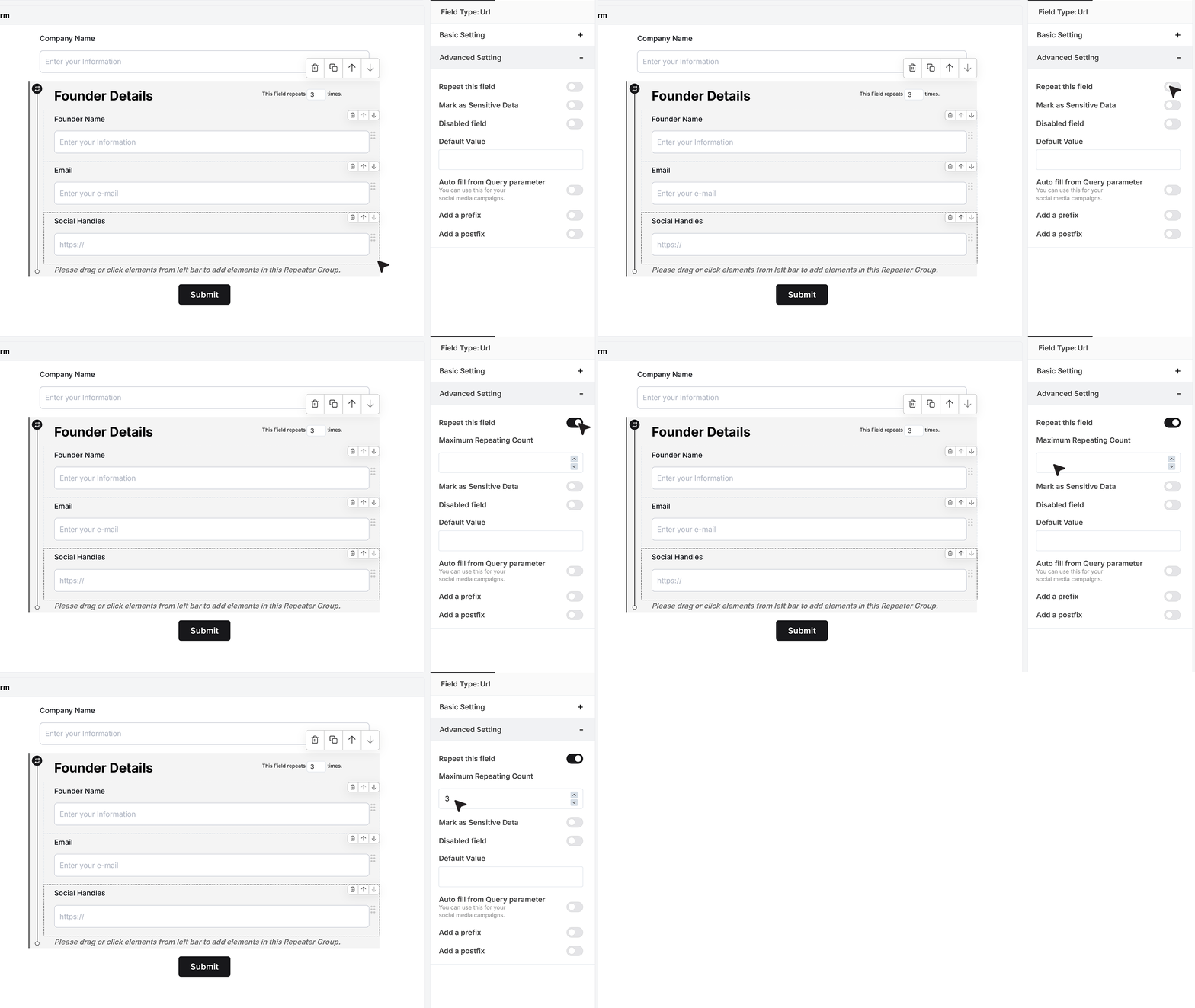
Within a repeater group, you can allow individual fields to repeat. For example, if a founder has more than one social profile, you can enable repetition on the Social Handles field and set a maximum limit.
This allows users to add multiple social links within the same group while keeping all the information connected to that founder.
How It Appears on the Live Form
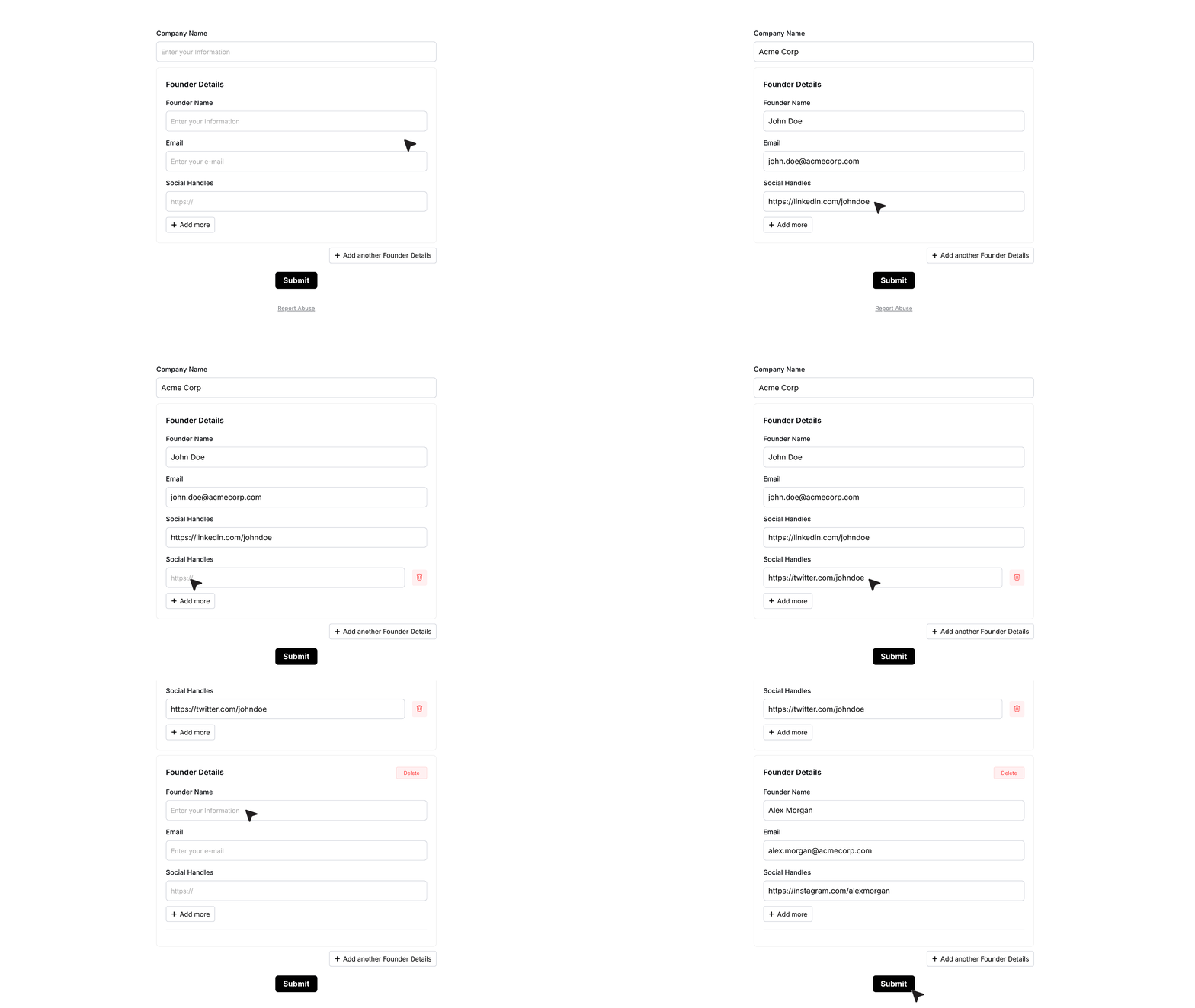
On the live form, users see a clearly defined section for the repeater group. They fill in the details for one founder by completing the fields inside the group. If repetition is enabled for the Social Handles field, they can add more than one link within the same group.
After completing one group, users can add another group to enter details for the next founder. Each group appears as a separate section, keeping the form easy to read and understand.
After Submission
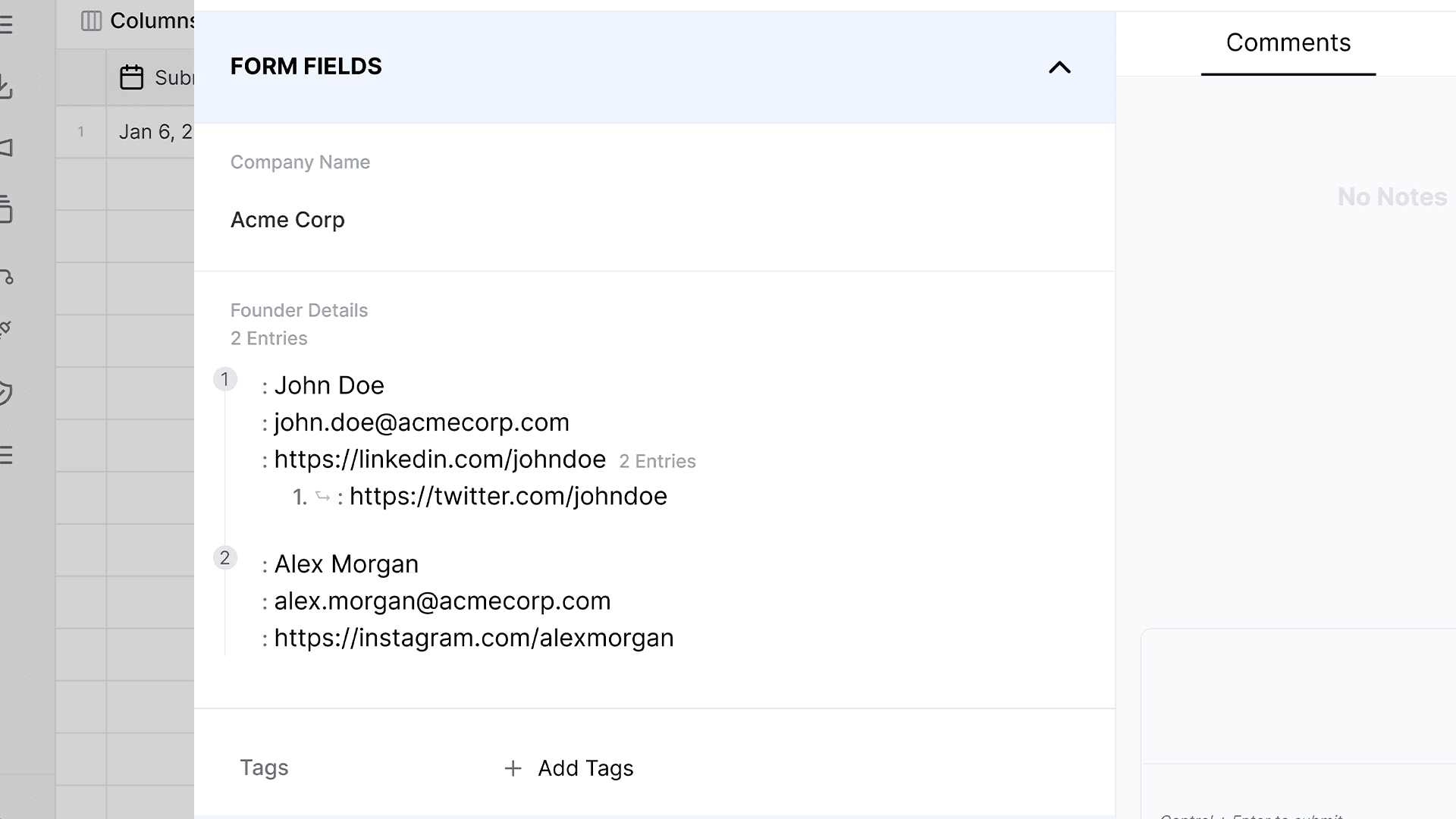
After the form is submitted, the data is saved in a clear and structured format.
Each repeated group is stored separately, along with any repeated fields inside it. This makes it easy to review responses and work with the data later.
FAQ's
A repeater group field is a form field that lets users add multiple sets of the same group of inputs. Instead of filling one field again and again, users can repeat a full section like name, email, and phone together. This is useful when collecting repeated data like team members, contacts, or products.
You should use a repeater group field when you need to collect the same type of information multiple times in one form. For example, founder details, employee records, family members, or multiple addresses. It helps keep your form clean and structured.
A repeatable field lets users repeat one field at a time, like adding multiple phone numbers. A repeater group lets users repeat a full set of fields together. This is better when multiple inputs belong to one unit, like a person or item.
Yes, you can set a limit on how many times a repeater group can repeat. This helps control the number of entries and keeps your form easy to manage.
Yes. You can allow specific fields inside the group to repeat. For example, a user can add multiple social links for one person inside a single repeater group.
A repeater group keeps your form simple and organized. Instead of showing many duplicate fields upfront, it lets users add sections only when needed. This reduces clutter and improves form completion rates.
Users see a section with grouped fields. After filling one set, they can click to add another group. Each group appears as a separate block, making the form easy to read and use.
All data is stored in a structured format. Each repeated group is saved as a separate entry, along with any repeated fields inside it. This makes it easy to review and process responses.
Yes. Repeater group fields are ideal for dynamic forms where the number of entries is not fixed. They help collect flexible data without making the form long or complex.
Yes. They are widely used in business forms like onboarding, applications, surveys, and CRM data collection. They help capture structured data for multiple entities in one submission.
Yes. You can use repeater groups to collect multiple contacts, addresses, or communication details in one form without creating separate forms.
No. Repeater group fields are designed to handle multiple entries smoothly. They help reduce form length and improve user experience, which can lead to better completion rates.
Common use cases include:
- Founder or team details
- Multiple product entries
- Family member information
- Event attendee lists
- Customer contact records
Repeater group fields help you build flexible and scalable forms. They reduce repetition, improve data structure, and make forms easier for users to fill and for teams to manage.