Spacer Field
The Spacer field lets you add empty space between fields in your form. It does not show any text, border, or line and it does not collect any data. It simply adds a vertical gap so your form feels less crowded and is easier to read.
This is useful when headings, dividers, and fields sit too close to each other and the form starts to look packed.
Adding a Spacer field
We already have an appointment form with a Heading at the top, a Paragraph showing clinic rules, and fields like Name, Phone Number, and Appointment Date.
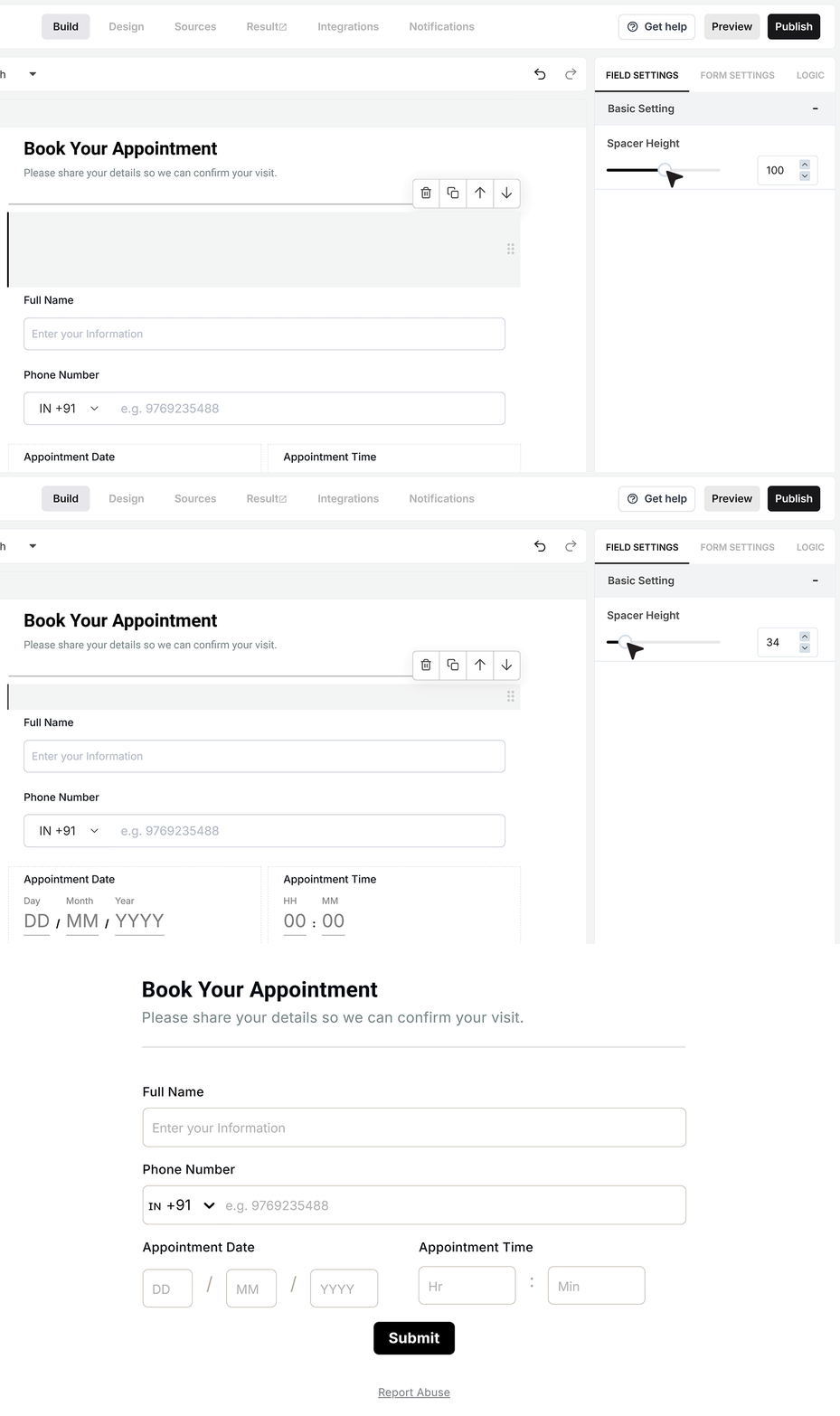
To make the layout more comfortable, we’ll add a Spacer between the Divider and the first field, which is the Name field. This ensures the fields don’t sit too close to the line and the form feels more open.
Drag the Spacer field into your form and place it between the Divider and the Name field.

Spacer settings
When you click on the Spacer field in the form builder, its settings appear on the right.
Here you can control how tall the empty space should be. If you only want a slight gap, keep the height small. If you want a clear visual break between sections, increase the height so the space is more obvious.
In the appointment form example, setting a medium height for the Spacer between the Divider and the Name field works well. It keeps the inputs away from the line without breaking the flow of the form.
FAQ's
A Spacer field is used to add empty space between form elements. It helps improve layout and makes the form easier to read. It does not show anything to users and does not collect data.
No. The Spacer field is purely for layout. It does not store, submit, or process any data.
Users will not see any visible element like text or lines. They will only notice better spacing between fields.
Use it when your form feels crowded. It works well between sections, after dividers, or before important fields to give breathing space.
Yes. You can adjust the height of the Spacer in the settings. A small height gives a subtle gap, while a larger height creates a clear separation.
They serve different purposes. Divider and Heading add visible structure. Spacer only adds space without any visual element. Use Spacer when you want clean spacing without extra lines or text.
No. Spacer fields do not affect validation, conditional logic, or form behavior in any way.
Yes. You can use as many as needed. Just avoid overuse, as too much spacing can make the form feel too long.
Yes, but in a good way. Proper spacing improves readability on mobile screens. You may want to test different heights to keep the form compact but clear.
There is no fixed value. Use small height for minor gaps and medium height for section breaks. Avoid very large spacing unless you want a strong visual separation.
Yes. You can place it between any fields, sections, or elements wherever spacing is needed.
No. Spacer is a lightweight layout element and does not impact performance.